Stand-Alone Tools
Tip
Click here to know more about the purpose and design of these tools.
Batch Action Tool
The open files are saved at :
\\path\to\project\PYB\software\BatchActionUIFunctionality
As the name suggests, this tool was designed to allow the artists to perform a particular “action” in batch on a list of multiple files. This allowed the artists to focus on their work without having to launch Blender for each task file just to perform a single action.
Currently supported list of actions include :
- Publish File :
The tool will go over the list of shots provided by the artist, check if it is approved on the CGIF database, and then publish the file (works if Vaidraa is running on the system) - Clear Local File :
This allows artists to quickly clear the local harddisk space by deleting the unrequired files from previous episodes. The tool will delete files only if they are published on the CGIF database, and it will keep a copy of the last 3 working versions while deleting the rest of the work files and playblasts.
User Interface
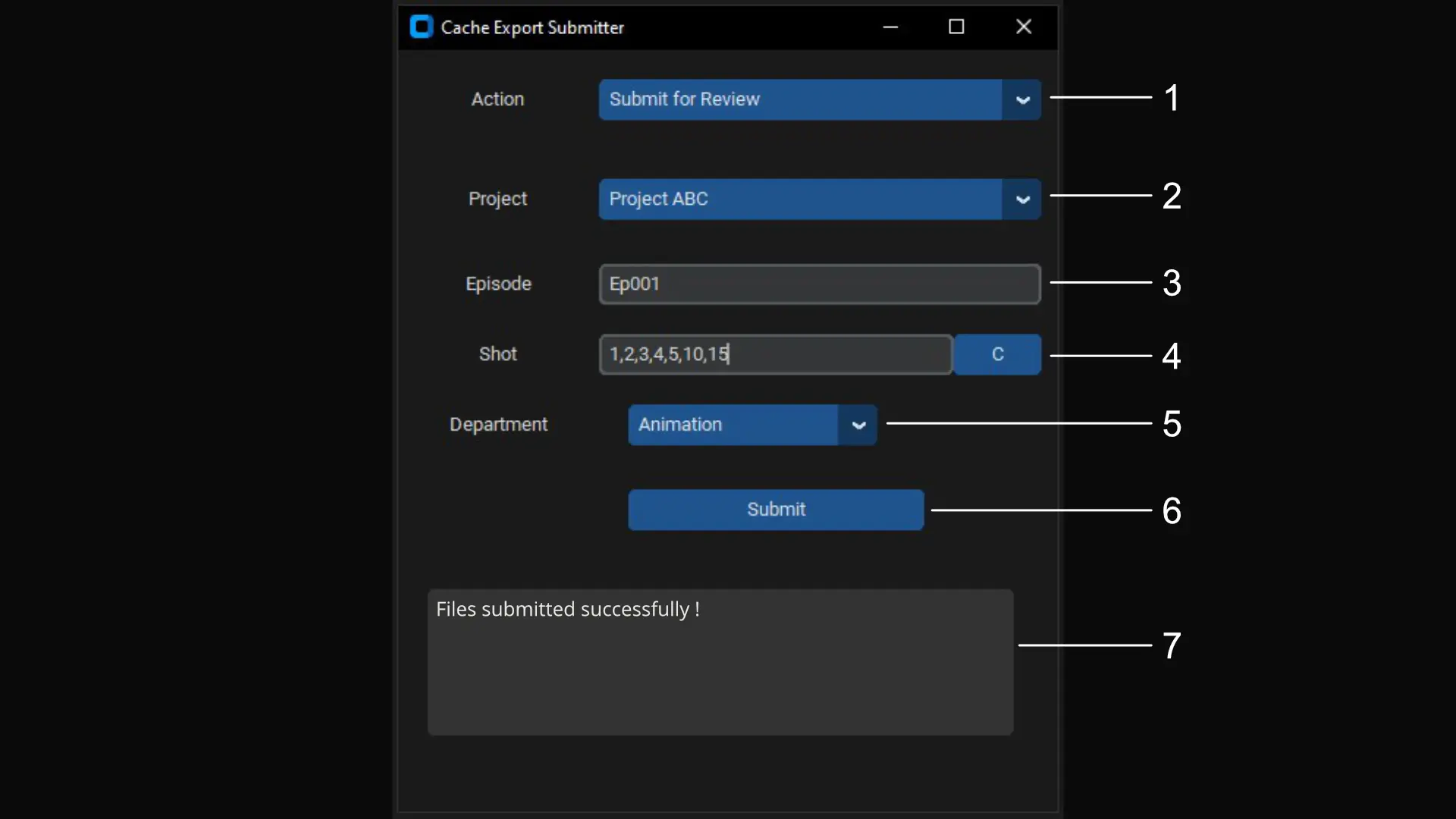
PYB Batch Actions Tool - User Interface
- Dropdown menu with list of actions customized to match project requirements
- Dropdown menu with list of ongoing projects - updates dynamically
- Episode number from selected project
- List of shot numbers from selected project and episode
- Dropdown menu with list of active departments from selected project
- Submit button
- Message window
Kitsu Tunnel
The open files are saved at :
\\path\to\project\PYB\software\kitsu_tunnelFunctionality
This tool was designed for the Production Team. It creates a bridge between the CGIF Kitsu and Client Kitsu database to easily exchange information about the project in batches.
Currently supported list of actions include :
- Sync Assets :
Updates the details of all assets from Client to CGIF Kitsu - Send for Approval :
Syncs preview files from CGIF to Client Kitsu. Works only on shot tasks that are marked asSFAon CGIF kitsu and skips if task is already marked asWFAon Client kitsu. - Get Client Comment :
Syncs feedback shared by client from Client to CGIF Kitsu. Works only on shot tasks that are marked asWFAon CGIF kitsu. - Check Breakdown Update :
Syncs Kitsu Breakdown list from Client to CGIF Kitsu. - Create New Episode :
This action can be executed by Production or IO team. It is used to create registry of a new episode on CGIF Kitsu during Ingestion process.
User Interface
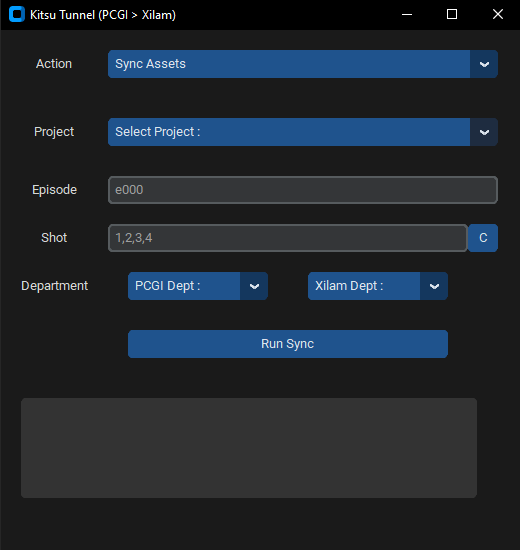
PYB Kitsu Tunnel - User Interface
Cache Export Submitter
The open files are saved at :
\\path\to\project\PYB\software\Renderpal_SubmitterFunctionality
This tool is used by the render team to submit multiple project files.
Currently supported list of actions include :
- Cache Export :
Submit a list of blender files to RenderPal for exporting cache. It checks if the files is approved on the CGIF Database before submitting the job. - Final Delivery :
Creates a copy of the list of blender files in the03_TO_CLIdirectory to be submitted back to the client. Converts the files back to the client’s file naming and folder structure as mention in the Folder Structure document. Works only on approved files.
User Interface
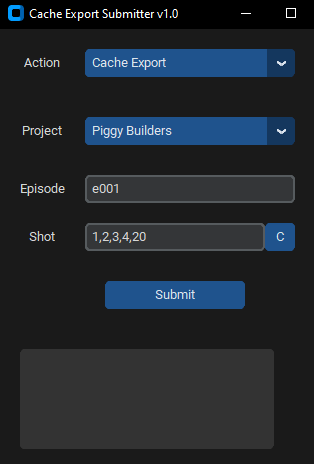
PYB Cache Export Submitter - User Interface
Links
Explore the following sections to learn more: