Blender Addon
CGIF Blender Tools is an addon with a set of tools specifically designed to ease the artists workflow while working on the Piggy Builders project in Blender.
The addon files are saved at :
\\path\to\project\PYB\software\addons\CGIF_Tools_BlenderThe addon has two main components :
CGIF Menu
The CGIF Menu is located at the top of the Blender Window. It allows artists to perform all the main actions that might be required while working on a shot.
Some of its main functionalities includes :
- Save File
- Save New Version : Saves the current file as a new version by incrementing the file version by 1
- Make Playblast : Renders a playblast with predefined settings in the
previewfolder - View Playblast : Opens latest playblast in RV Player
- Send to Kitsu : Uploads the latest playblast for review to Kitsu and sets the status to
WFA - Asset Submenu
- Asset Tracker : Checks if the list of assets in current work file matches the Kitsu Breakdown list. Report a message for user if any asset is extra or missing
- Update Selected Asset : All selected assets are deleted from current file and reimported to get the latest updates. Animation is preserved. Works only if asset rig is selected.
- Import Missing Asset : Imports any assets that might be reported as missing by the Asset Tracker
- Delete Selected Asset : Deletes the asset file for any selected mesh or rig type object
- Add Subdiv Modifier : Auto-detects the mesh of
characterandproptype assets and adds a subdivision modifier. Subdivision value is references from a json file provided by the client
- Send for Approval (SFA) Submenu
- Send For Approval : Uploads the latest playblast for client review to Kitsu and sets the status to
SFA - SFA Playblast [Render Farm] : Creates a job on RenderPal to create a high quality playblast with predefined settings
- Send For Approval : Uploads the latest playblast for client review to Kitsu and sets the status to
- Quit Blender : Closes the current blender window
- End Session : Makes a copy of current work file on server and Ends the current session on Vaidraa
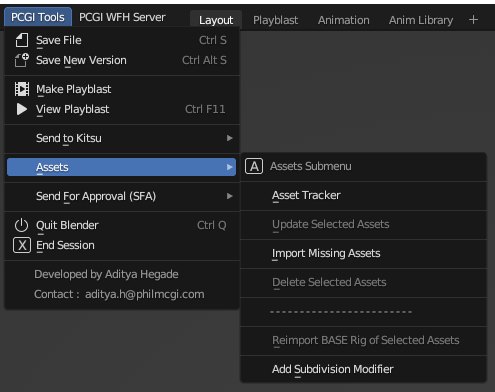
PYB Blender Addon - Topbar Menu
CGIF Tools Tab
The CGIF Menu is located in the side menu in any 3D Viewport in Blender. It is a compilation of small tools and shortcuts for artists that can be quickly accessed and speed up their workflows.
Some of its main functionalities includes :
- Make Playblast : Renders a playblast with predefined settings in the current viewport in the
previewfolder - View Playblast : Opens latest playblast in RV Player
- Make SFA Playblast : Renders a high quality playblast with predefined settings in the current viewport in the
previewfolder - View Playblast : Opens latest SFA playblast in RV Player
- Viewport Subpanel
- Optimize : An On/Off switch that toggles the Simplify function built into Blender
- Clear View : A collection of On/Off switches to quickly clean up the 3D Viewport
- Guides : A collection of On/Off switches to quickly toggle the guide lines in active camera view
- Camera Subpanel
- Reference Video : A Show/Hide switch that toggles the visibility of the reference video in active camera view
- Metadata : Option to Add/ Update/ Hide/ Delete the metadata objects in the current working file
- Animation Subpanel
- Copy/Paste BG Anim : Copy/Paste the animation keyframes on all supported objects in the background asset type (can be used across different Blender files)
- Rig Layer Presets : A Show/Hide switch that toggles the visibility of various rig layers on the current selected rig object
- Quick Fixes : A collection of customized scripts specific to certain episodes / asset types
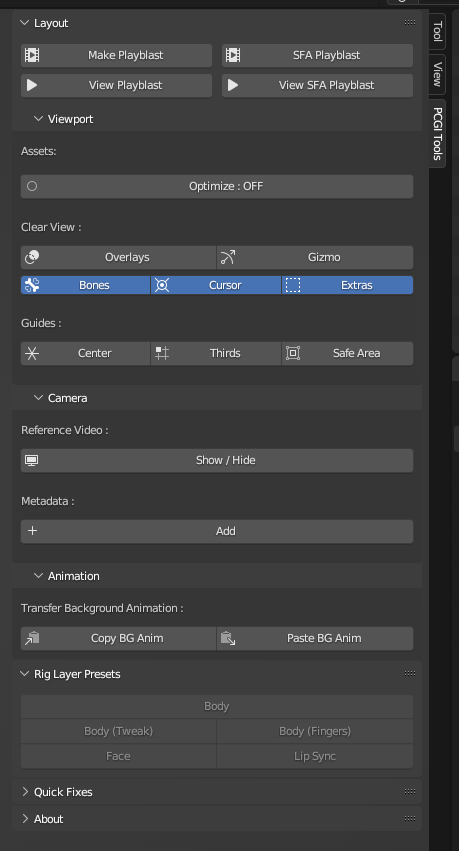
PYB Blender Addon - Tools Tab (n-Panel)
Tip
Click here to know more about how we integrate Kitsu API with Python.
Links
Explore the following sections to learn more: