Blender Addon
CGIF Blender Tools is an addon with a set of tools specifically designed to ease the artists workflow while working on the Piggy Builders project in Blender.
The addon files are saved at :
\\path\to\project\CYK\software\addons\CGIF_WFH_Tools_BlenderThe addon has two main components :
CGIF WFH Menu
The CGIF WFH Menu is located at the top of the Blender Window. It allows artists to perform all the main actions that might be required while working on a shot.
Some of its main functionalities includes :
- Save File
- Save New Version : Saves the current file as a new version by incrementing the file version by 1
- Save Backup Version : Saves a copy of the current file and its playblast in the
outfolder. Raises an error if playblast is not found for current version - Make Playblast : Renders a playblast with predefined settings in the
previewfolder - View Playblast : Opens latest playblast in video Player
- Send to Kitsu : Uploads the latest playblast for review to Kitsu and sets the status to
WFA - Asset Submenu
- Asset Tracker : Checks if the list of assets in current work file matches the Kitsu Breakdown list. Report a message for user if any asset is extra or missing
- Update Selected Asset : All selected assets are deleted from current file and reimported to get the latest updates. Animation is preserved. Works only if asset rig is selected.
- Import Missing Asset : Imports any assets that might be reported as missing by the Asset Tracker
- Delete Selected Asset : Deletes the asset file for any selected mesh or rig type object
- Add Subdiv Modifier : Auto-detects the mesh of
characterandproptype assets and adds a subdivision modifier. Subdivision value is references from a json file provided by the client
- Publish File : Makes a copy of the current working files in the
out\publishfolder and sets the kitsu status toPUB. Raises an error if playblast is not found for current version or if file status is not Approved on kitsu. - Quit Blender : Closes the current blender window
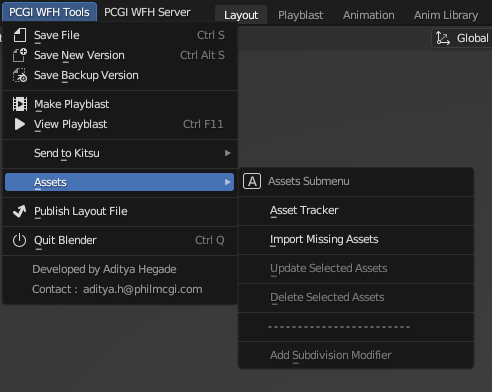
CYK Blender Addon - Topbar WFH Menu
CGIF Server Menu
The CGIF Server Menu is also located at the top of the Blender Window. It allows artists to upload and download any project related files from the CGIF FTP server directly from Blender.
Some of its main functionalities includes :
- DOWNLOAD
- Blender Submenu : A list of options to update current addon, reset preferences, etc
- Client Files Submenu : Options to download asset files and library files shared by client from CGIF FTP Server to local project directory
- Episode Files Submenu : Allows artist to download working files from a list of all active episodes from CGIF FTP Server to local project directory
- Documents Submenu : Allows artist to download documents and reference files of entire project as well as from a list of all active episodes from CGIF FTP Server to local project directory
- UPLOAD
- Backup Filess Submenu : Options to upload current working file or working files of entire episode from local project directory to CGIF FTP Server
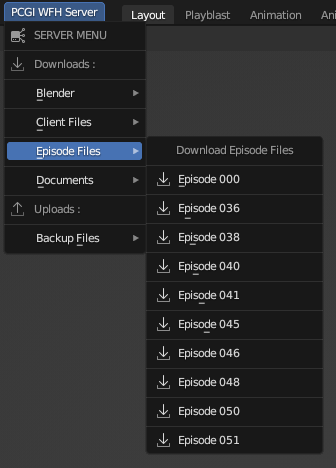
CYK Blender Addon - Topbar Server Menu
CGIF Tools Tab
The CGIF Menu is located in the side menu in any 3D Viewport in Blender. It is a compilation of small tools and shortcuts for artists that can be quickly accessed and speed up their workflows.
Some of its main functionalities includes :
- Low Playblast : Renders a quick playblast with low quality settings in the current viewport
- High Playblast : Renders a slower playblast with high quality settings in the current viewport
- View Playblast : Opens latest playblast in a video player
- Viewport Subpanel
- Viewport Display : A collection of On/Off switches to quickly toggle visibility of various asset types in current working file
- Optimize : An On/Off switch that toggles the Simplify function built into Blender
- Clear View : A collection of On/Off switches to quickly clean up the 3D Viewport
- Guides : A collection of On/Off switches to quickly toggle the guide lines in active camera view
- Camera Subpanel
- Reference Video : A Show/Hide switch that toggles the visibility of the reference video in active camera view
- Metadata : Option to Add/ Update/ Hide/ Delete the metadata objects in the current working file
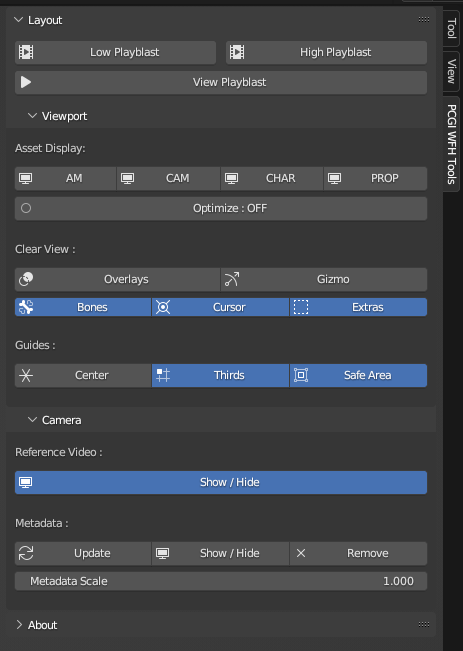
CYK Blender Addon - Tools Tab (n-Panel)
Tip
Click here to know more about how we integrate Kitsu API with Python.
Links
Explore the following sections to learn more: